
YangaSport Nigeria App
The YangaSport Nigeria app puts live football odds, Aviator rounds and Naira deposits into a single Android package built for quick loading on Lagos mobile networks. Compared with the browser site, the native app cuts page load time noticeably during live betting windows, when odds refresh every few seconds, and a Lagos-based bettor searching for a faster way to catch live Aviator rounds during a commute typically installs the APK rather than relying on mobile data through a browser tab.


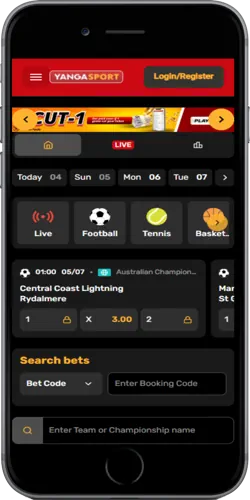
Getting the APK onto an Android phone
Nigerian players download the YangaSport Nigeria APK directly from the operator's site rather than a third-party store, since the app currently has no Google Play Store listing due to regional betting app restrictions. Before installing, a phone needs "Unknown sources" enabled in Android settings, a one-time step that takes under a minute on most Samsung or Tecno devices common in the Lagos market, and this single setting change is the only technical barrier standing between a first-time visitor and a working install.
The installer file runs to approximately 25MB, noticeably smaller than many rival sportsbook apps that exceed 40MB, which keeps download time short even on a 3G connection outside major cities like Ibadan or Kano. The app is scanned for malware before each release and only distributed from the official YangaSport domain, a precaution against the fake APK files that circulate on some Nigerian forums and social media groups claiming to offer the same install with extra bonus credit.
- Enable Unknown sources in phone settings
- Download the APK from the official site
- Open the file and confirm installation
- Log in or register inside the app
What the app actually adds beyond the browser
Beyond a smaller footprint on the phone, the native app changes how quickly a player reacts to a shifting football scoreline or a fast Aviator round, since it skips the browser rendering step that adds a noticeable delay on older Android handsets. The card grid below breaks down the features that separate the app experience from simply bookmarking the mobile site.
Push notifications carry most of the practical benefit for regular bettors: a live odds alert during a Nigerian Premier Football League match flags a shifting scoreline within seconds, that alert then draws the player back into the app to review updated markets, and this loop of notification-to-return-visit is why app users tend to check live odds more often than browser-only users during weekend fixtures.
Android against iOS access on YangaSport Nigeria
Android users get a dedicated native APK, while iPhone users currently access YangaSport Nigeria through a web-app shortcut added to the home screen rather than a listing in the Apple App Store, a restriction tied to Apple's stricter policy on real-money gambling apps. Both routes reach the same account and balance, but the Android APK supports biometric fingerprint login, a feature not yet available on the iOS web-app shortcut.
| Feature | Android APK | iOS web-app |
|---|---|---|
| Installation source | Official site direct download | Safari "Add to Home Screen" |
| Minimum OS version | Android 5.0 or higher | iOS 13 or higher |
| File size | Approximately 25MB | No install, browser-based |
| Biometric login | Supported | Not supported |
| Push notifications | Supported for live odds alerts | Limited by Safari restrictions |
The gap between the two platforms comes down to what Apple allows rather than anything YangaSport controls directly, and iOS users who want closer parity can still pin the web-app shortcut to their home screen for one-tap access, even without native push notifications. The app receives an update roughly once a month, usually bringing a refreshed odds engine or added payment options, a cadence slightly faster than the quarterly updates common among some competing Nigerian betting apps.
Keeping an installed app safe and current
An APK installed outside the Play Store still needs the same basic security habits as any banking app: checking that the download link points to the official yangasport.com.ng domain, avoiding APK files shared through WhatsApp groups, and reviewing the permissions requested during install, which are limited to storage, network access and notifications rather than contacts or camera. A player who sideloads an unofficial copy risks a modified APK that can intercept login details, something the official monthly release cycle is designed to prevent through checksum verification before publishing.
Update prompts appear inside the app itself rather than through the Play Store's automatic system, so a player needs to check the app or the official site periodically for a new APK version, typically once a month. This manual update step is slightly less convenient than Play Store apps that update silently in the background, but it also means every update comes directly from YangaSport rather than through a third-party distribution layer.
Managing deposits and login inside the app
Once installed, a player logs into the app using the same phone number and password created on the website, and a fingerprint or PIN can be set afterward for faster repeat access. Deposits inside the app work through Opay, Palmpay or bank transfer, crediting a balance in under a minute for the instant methods, the same timing as the desktop site, so switching between the app and the browser mid-session never resets a pending deposit.
A player who forgets their password recovers it the same way as on the browser site, through an SMS OTP, since the app shares one account system with the website rather than running a separate login database. This is different from some competing Nigerian apps that require a fresh registration inside the app itself, which can create two separate account balances and cause confusion around withdrawal history.